Validation and Publishing
To ensure GOAT does not run into any unexpected issues, Scenarios must be validated before trainees have access to them. Validation performs a deep check of the scenario to ensure that everything is set up correctly, none of the scenario objects have broken references or invalid values, and none of the images have been deleted.
Validation does not guarantee that the training represents a complete path through the scenario, covers every path of action a trainee can take, or would be effective. It simply ensures GOAT itself does not crash or get stuck unexpectedly during training.
Validation Process
Whenever a change is made in a scenario, it becomes marked as invalid, meaning it has to be validated again before it can be published. To validate a scenario when a batch of changes is complete, press the Validate button that appears in the top menu while editing a scenario.
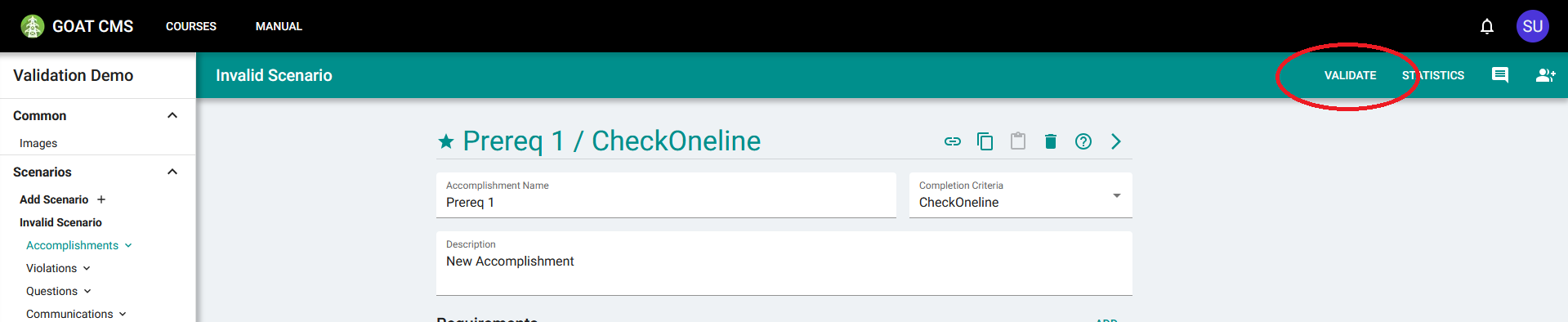
This will open the Validation window. Here you can start the validation process using the Run Validation button to search for any problems detected.
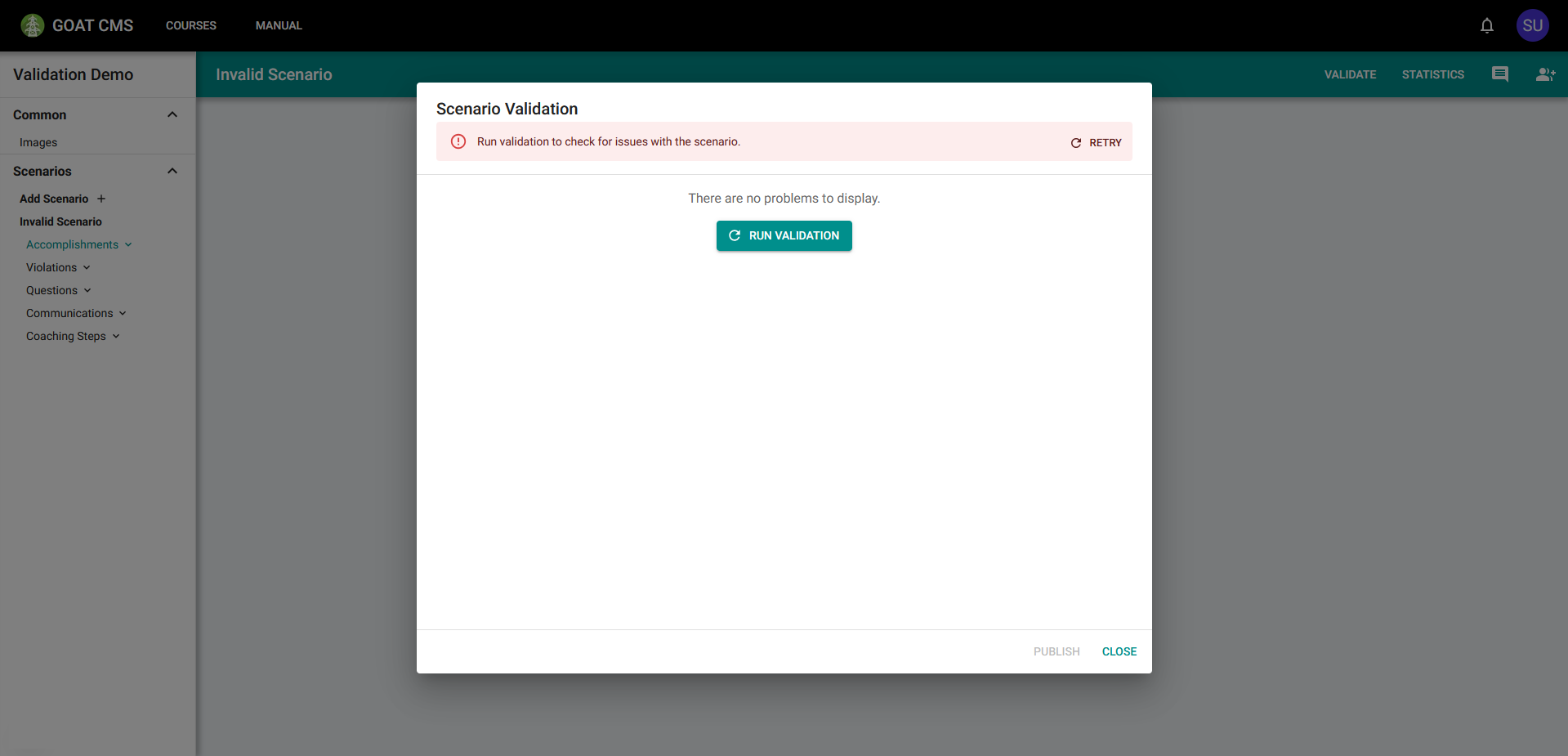
After running validation, you will likely be presented with a list of the problems that were detected in the scenario. Each entry in this list represents a single issue. Entries state what type of object has the problem, as well as a name and link to the exact object causing the issue. Entries can be expanded by clicking on them to see more information about the exact cause of the problem.
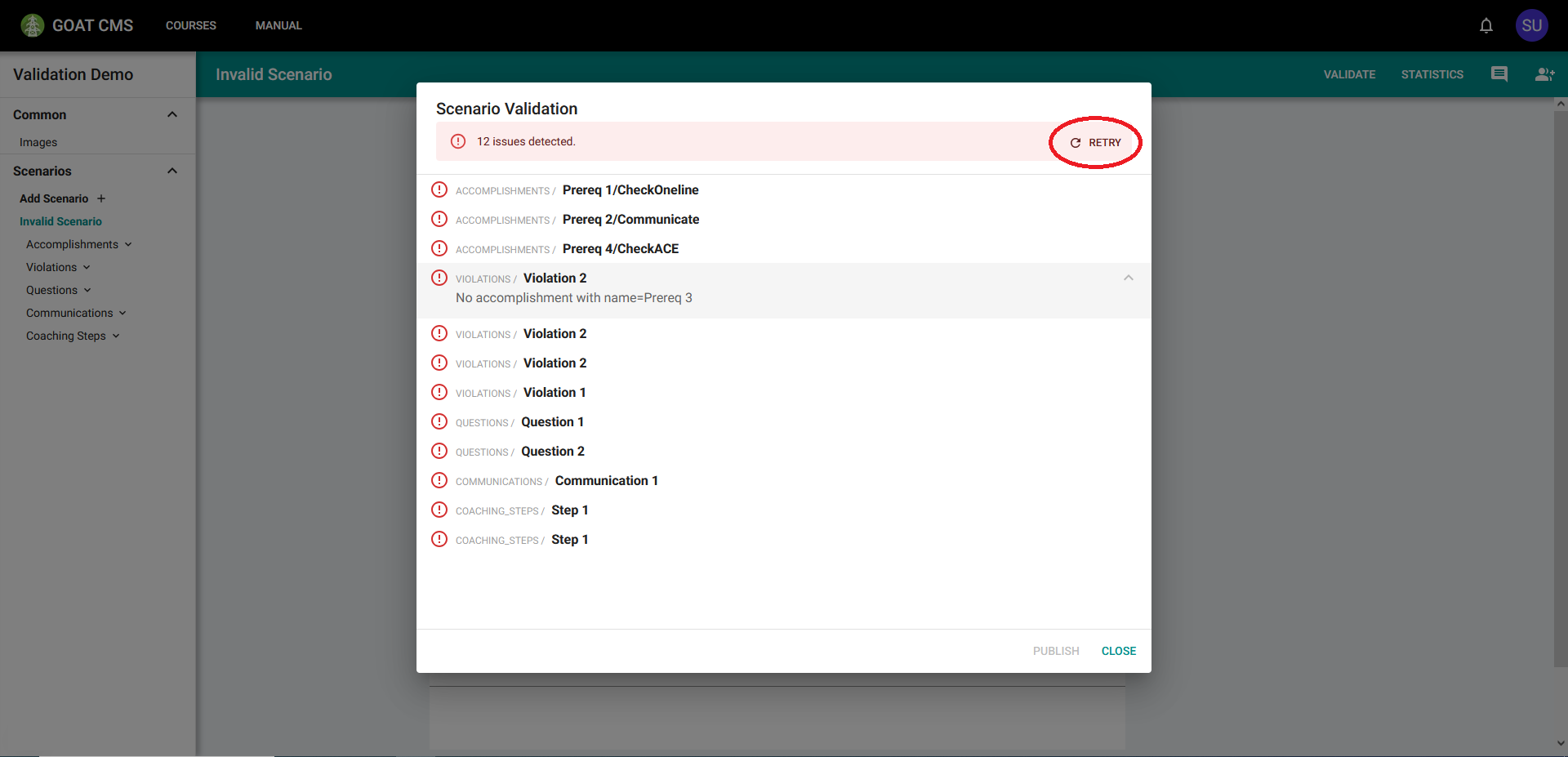
The expanded problem states, "No accomplishment with name=Prereq 3". This implies that the affected violation referenced some accomplishment called "Prereq 3" that has since been deleted. Removing the outdated reference (replacing it if necessary) will resolve this problem.
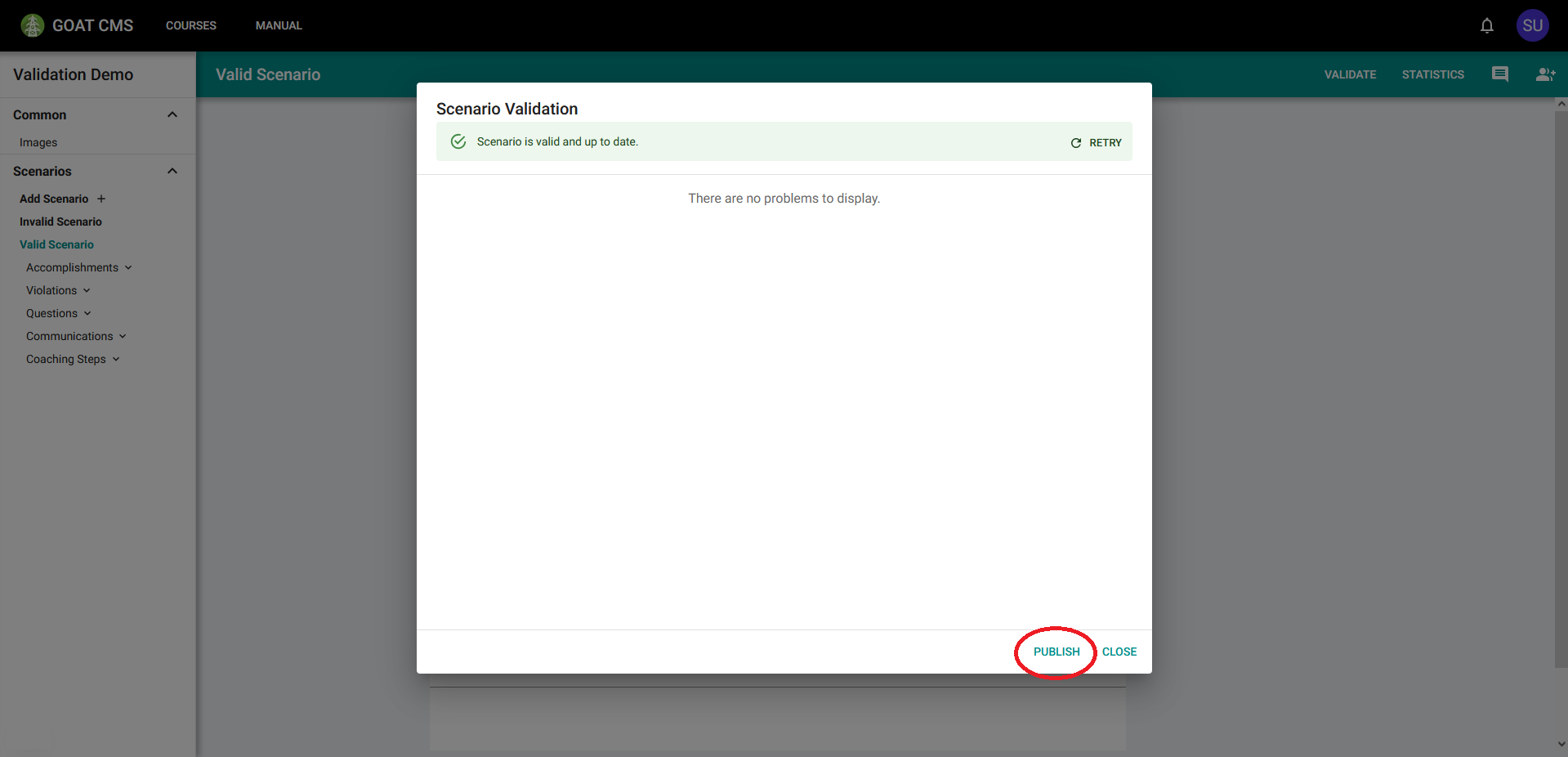
When you think a problem has been resolved, you can use the Retry button at the top of this window to validate again and ensure the problem list is empty. After all problems have been resolved and the scenario has been validated for the final time, it is ready to publish, which is done with the Publish button at the bottom of the Validation window.
Types of Problems
There are many types of problems that can occur when creating a scenario, which will be described here. The most common issue is an invalid field:

This error means that whatever value was supplied to the Expert Answer field was invalid. In this case, it's because that expert answer has two segments while that question's answer stub has only one blank.
This problem can occur in the following places:
- Expert Answers on Questions, with a mismatched number of segments to the corresponding answer stub.
- Question Inputs on Violations, with a mismatched number of inputs to the amount of inputs in the associated Question's content field.
- Question content or answer stubs that were not constructed correctly.
- Disallowed special characters in most text fields.
- Violation triggers that were not constructed correctly.
- Accomplishment requirements that were not constructed correctly.
- Check triggers that were not constructed correctly.
- Accomplishments or Violations referencing Communications or Checks that don't exist.
To resolve the problem, update the field to be in the appropriate format.
The next most common issue is a broken reference, meaning the affected object referenced some other object that has since been deleted. This example was described in the previous section. Here is another example:

The question references some image, saying it does not exist. This is because the image was deleted.
This problem can occur in the following places:
- Accomplishments, Violations, Communications, and Coaching Steps may refer to accomplishments by name for prerequisites and antirequisites. If the accomplishment is deleted (or renamed), the reference will break.
- Accomplishments with the Communicate criteria can reference Communications in their requirements. If the Communication is removed or its name or abbreviation are changed, the reference will break.
- Violations must reference the Question they trigger. If the Question is deleted, the reference will break.
- Violation triggers can reference communcations with the Communicate action type, or accomplishments with the Skipped action type. If these objects are removed or renamed, the reference will break.
- Coaching Steps may reference an Accomplishment to affect when and how they are displayed. If the Accomplishment is deleted, the reference will break.
- Questions may display a list of images, both before and after the trainee provides their answer. If an image is deleted, the reference will break.
To fix this issue, you must remove the broken reference, and potentially replace it with something else to fulfill the same purpose.
Another possible issue is duplicate identifiers, such as two Questions having the same name. The application is generally smart enough to not allow this to happen in the first place, but it's described here for completeness:

This problem arose because there are two accomplishments named "Prereq 4" with the criteria "CheckACE".
If not prevented by the application, this can arise in all scenario objects. Accomplishments representing the same milestone can have the same name as long as they have different criteria. To fix this issue, rename the duplicates.
The remaining issues should be much less common. Another issue is when Accomplishment prerequisites form a "circular dependency."

Prereq 1 has Prereq 2 as a prerequisite, but Prereq 2 has Prereq 1 as a prerequisite, meaning neither accomplishment can ever be completed.
If an Accomplishment lists other Accomplishments as prerequisites, it can only start to be completed if all prerequisites have been completed. However, if this dependency forms a loop (such as above with Prereq 1 and Prereq 2 depending on each other), then each accomplishment in the loop indirectly depends on itself and thus can never be completed. To fix this issue, the loop must be broken.
A similar issue occurs if an object (e.g. Violation 1) references some accomplishment (Accomplishment 3) as both a prerequisite and an antirequisite. This is invalid because that means Object 1 can only be activated if Accomplishment 3 has both been completed and not been completed, which is impossible. To fix this issue, ensure no prerequisites are also listed as antirequisites for the same object (or vice versa).
Another issue occurs when accomplishments with the same name differ on certain fields:

In this example, the accomplishment "Prereq 1 / GenValueChange" has a different phase from "Prereq 1 / CheckOneline"
Because accomplishments with the same name represent the same milestone, there are some things that must remain consistent across all accomplishments with that name:
- Prerequisites, the accomplishments that must be reached before the accomplishment can start to be completed.
- Antirequisites, the accomplishments that not must have been reached for the accomplishment to be completed.
- Phase, the phase in the After-Action Report in which actions that contribute to this accomplishment should be highlighted.
- ITS Score, the score earned for reaching this accomplishment, which is displayed in ITS.
To fix this issue, ensure all accomplishments with the same name have the same values accross these four fields.
Publishing
Once a scenario has been validated with no problems, it can be published. Publishing the scenario creates a copy at its current state and allows trainees enrolled in the course to start an attempt. The scenario can then continue to be worked on, but changes will not appear for trainees until it's been validated and published again.
Published versions are stored and saved whenever a trainee attempts a scenario. This ensures that the exact version of the scenario that trainee attempted remains available until the attempt is deleted, which is helpful for things like displaying the exact answered questions on the Statistics page.