Transmission Simulator
The transmission simulator runs on the 3KeyMaster software developed by Curtiss Wright.
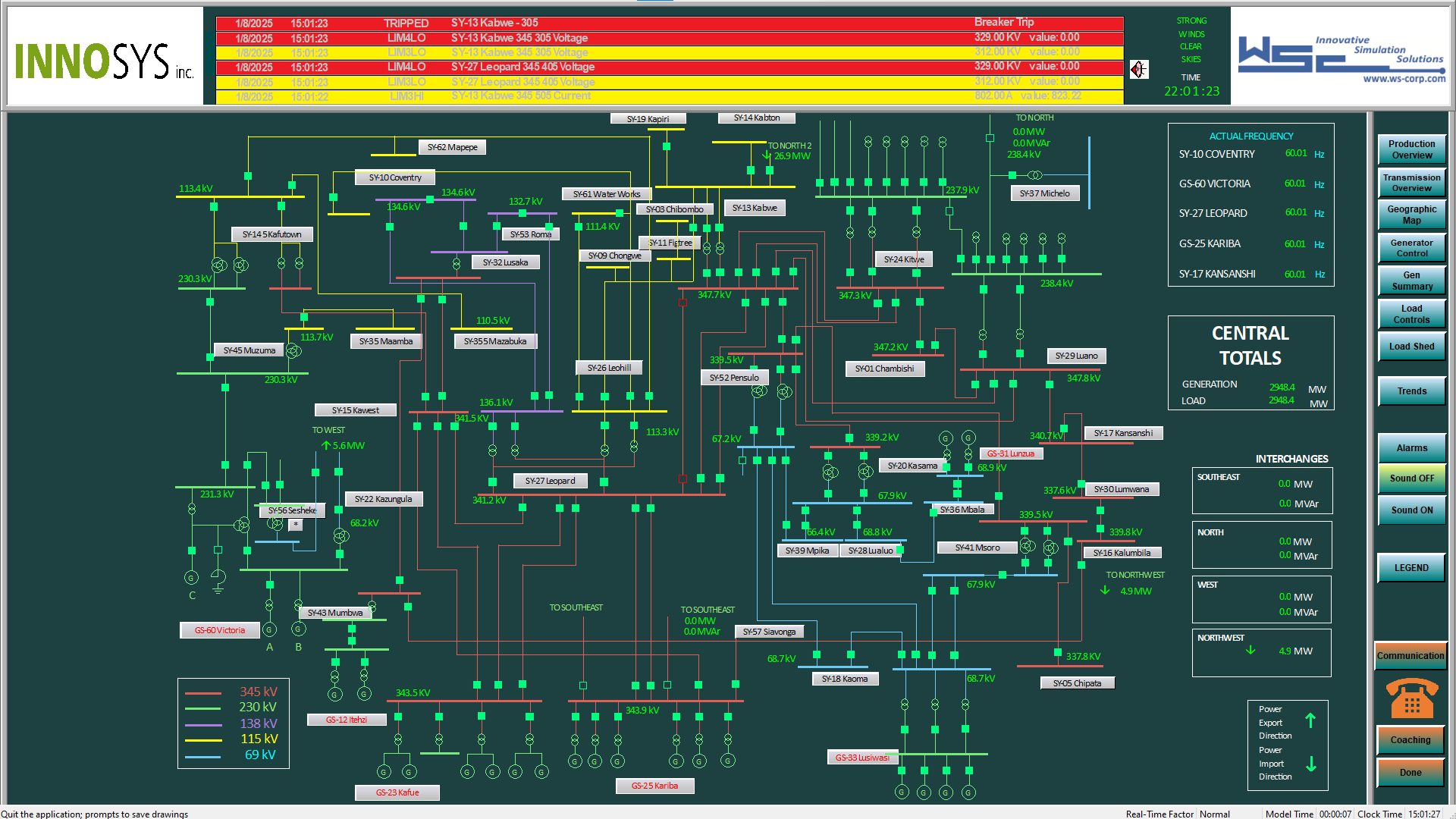
Transmission Overview screen in the simulator. This is the initial page the trainee sees. This shows an overview of each station and how they are connected. Alarms can be seen at the top.
This documentation will not go into much detail about the simulator in order to emphasize more about how the scoring works and how to create training scenarios. However, this page will cover the changes made to the simulator for GOAT's purposes, and the action types, requirements, and checks that are added by this simulator.
Action Types
The transmission simulator adds the following action types:
Capacitor: Represents opening or closing a circuit breaker connected to a capacitor.
Action String structure: Capacitor:Breaker:Status:Oneline
Breaker: The breaker that was modified.Status: The action the trainee performed on the breaker.OPENorCLOSE.Oneline: The oneline page it was modified from.
Changed: Represents switching a togglable setting on a generator, such as enabling AGC.
Action String structure: Changed:Generator:Equipment:Status
Generator: The generator targeted by the change.Equipment: The equipment affected by the change, such asModefor AGC.Status: The status of the equipment.1if enabled,0if disabled.
Checked: Represents checking a station line window, or checking the Production Overview or Trends pages to view the value of ACE.
Action String structure: Checked:Window
Window: The name of the station line, or "ACE" if checking Production Overview or Trends.
CircuitBreaker: Represents opening or closing a circuit breaker that is not handled by other breaker action types.
Action String structure: CircuitBreaker:Breaker:Oneline:Status
Breaker: The breaker that was modified.Oneline: The oneline page it was modified from.Status: The action the trainee performed on the breaker.OPENorCLOSE.
Decreased: Represents decreasing a numerical value on a generator, such as the MW output value.
Action String structure: Decreased:Generator:Equpiment:New Value:Old Value
Generator: The generator targeted by the change.Equipment: The equipment affected by the change, such asMW_SPfor the MW output setpoint.New Value: The value after the change.Old Value: The old value before the change.
FailedGenChange: Represents attempting to modify a numerical value on a generator, such as the MW output value, but failing in some way.
Action String structure: FailedGenChange:Direction:Generator:Equipment:Attempted Value:Old Value:New Value:Reason
Direction: The direction of the actual resulting change (Increased, Decreased, or Unchanged).Generator: The generator targeted by the change.Equipment: The equipment affected by the change, such as MW_SP.Attempted Value: The value they attempted to change it to.Old Value: The old value before the change.New Value: The actual resulting value after the change.Reason: The reason the change failed, i.e. AboveMax
FailedGenChange actions are special because, if they do result in a change, they are scored a second time as a correct action that corresponds to the result of the failed change. For example, if they try to increase power from 3 MW to 10 MW, but the maximum output for that generator is 8 MW, that registers as a FailedGenChange with the AboveMax reason. But the generator's output still gets increased from 3 to 8 MW, so the action gets scored again as a regular Increased action with those values.
Increased: Represents increasing a numerical value on a generator, such as the MW output value.
Action String structure: Increased:Generator:Equpiment:New Value:Old Value
Generator: The generator targeted by the change.Equipment: The equipment affected by the change, such as MW_SP.New Value: The value after the change.Old Value: The old value before the change.
Intertie: Represents changing the import rate of power from the NW intertie.
Action String structure: Intertie:Rate
Rate: The new import/export rate. Positive values refer to exporting power.
LoadShed: Represents opening or closing a load-shed circuit breaker, which results in shedding load.
Action String structure: LoadShed:Breaker:Shed Region:Shed Name:Shed Amount:Status
Breaker: The breaker that was modified.Shed Region: The region in which load was shed.Shed Name: The name of the specific load shed target.Shed Amount: The amount of power in MW that was traveling through the breaker at the time of shed, which corresponds to how much load was shed.Status: The action the trainee performed on the breaker.OPENorCLOSE.
Opened: Represents opening a window in the simulation that is not tracked by the Checked action type.
Action String structure: Opened:Window
Window: The name of the window that was opened.
Reactor: Represents opening or closing a circuit breaker connected to an inductive reactor.
Action String structure: Reactor:Breaker:Status:Oneline
Breaker: The breaker that was modified.Status: The action the trainee performed on the breaker.OPENorCLOSE.Oneline: The oneline page it was modified from.
ShedEval: Created at the end of the scenario to evaluate the trainee's performance when shedding load. There will likely be several violations corresponding to this one action.
Action String structure: ShedEval:Did Shed:Shed Prematurely:After Mitigating:After Resolved:Shed Amount
Did Shed: Yes if they ever shed load, No if they should have but didn't, and Unneeded if they didn't but didn't need to.Shed Prematurely: Yes or No depending on if their first shed was considered too far before the time limit to be needed.After Mitigating: Before or After depending on if their first shed was before their first mitigating action.After Resolved: Unresolved or Resolved depending on if their first shed was before or after the scenario was resolved.Shed Amount: Insufficient, Appropriate, or Excessive. How much load they shed relative to how much was needed.
StationLineCB: Represents opening or closing a circuit breaker between two station lines.
Action String structure: StationLineCB:Breaker:Source Oneline:Destination Oneline:kV:Status
Breaker: The breaker that was modified.Source Oneline: The oneline page it was opened from, at the start of the connection.Destination Oneline: The oneline at the other end of the connection.kV: The voltage of this line.Status: The action the trainee performed on the breaker.OPENorCLOSE.
TransformerCB: Represents opening or closing a circuit breaker that corresponds to a transformer.
Action String structure: TransformerCB:Breaker:Input kV:Transformer:Output kV:Status:Oneline
Breaker: The breaker that was modified.Input kV: The voltage at one end of the transformer.Transformer: The transformer connected to this breaker.Output kV: The voltage at the other end of the transformer.Status: The action the trainee performed on the breaker.OPENorCLOSE.Oneline: The oneline page it was modified from.
TransformerTap: Represents adjusting taps on transformers.
Action String structure: TransformerTap:Transformer:Oneline:Tap
Transformer: The transformer that was adjusted.Oneline: The oneline page this was adjusted on.Tap: How the transformer was adjusted, either +1 or -1.
Accomplishment Criteria
The transmission simulator adds the following accomplishment criteria.
CheckOneline: Met when the trainee views the pages representing a station line.
Requirement structure: Station Name
Station Name: The name of the station that was viewed.
GenValueChange: Met when the trainee changes a numerical value on a generator, such as MW output, ramp rate, etc.
Requirement structure: Direction - Generator - Equipment
Direction: Which direction the change was in (Increased or Decreased).Generator: Which generator the change was made on.Equipment: Which equipment was changed, e.g.MW_SPorMW_RATE.
GenEquipChange: Met when the trainee changes a toggleable setting on a generator. Currently the only supported setting is AGC.
Requirement structure: Status - Generator - Equipment
Status: If the setting is Enabled or Disabled.Generator: Which generator the change was made on.Equipment: Which equipment was changed, e.g.AGC.
CheckACE: Met when the trainee visites the Production Overview or Trends pages in the simulation and can see the value of ACE, the balance of production and load.
Requirement structure: <unsupported>
OpenWindow: Met when the trainee views a window other than those used for the CheckACE and CheckOneline criteria, such as the Alarms page.
Requirement structure: Window
Window: The window that was opened.
LoadShed: Met when the trainee sheds any load.
Requirement structure: <unsupported>
Requirements will likely be added to this criteria in the future, when scenarios need to be developed to cover specific types of shedding load. Current scenarios recommend against it entirely, so it has not been implemented beyond this. Checks can be used for specific MW targets.
Intertie: Met when importing power from the intertie at the northwest.
Requirement structure: <unsupported>
Requirements may be implemented for this criteria in the future if scenarios need to be developed to cover it in more detail, but it's probably better to use checks.
Checks
The transmission simulator adds the following check types and targets:
ACE: The balance of production and load.
Value: Fired with the value of ACE whenever it changes.
Unchecked: Fired with the value of ACE whenever it changes and it's been more than 3 minutes since ACE was last checked.
BreakerA: Current flowing through a circuit breaker.
<breaker_name>: Fired with this breaker's current when it changes.
BreakerMW: Wattage flowing through a circuit breaker.
<breaker_name>: Fired with this breaker's wattage when it changes.
GeneratorRampRate: Rate of change of power generated by a specific generator.
<generator_name>: Fired with this generator's ramp rate when it changes.
GeneratorSetpoint: Power generated by a specific generator.
<generator_name>: Fired with this generator's setpoint when it changes.
GeneratorVoltage: Voltage generated by a specific generator.
<generator_name>: Fired with this generator's voltage when it changes.
LoadShed: The trainee opens circuit breakers to cut off MW consumption by various customers.
Amount: When shedding load, fired with the amount of load that was shed.
Total: When shedding load, fired with the total amount of load that was shed across all actions.
RelativeAmount: When shedding load, fired with the amount of load that was shed, divided by the overload at time of first shed.
RelativeTotal: When shedding load, fired with the total amount of load that was shed across all actions, divided by the overload at time of first shed.
Overload: The total excess wattage over certain breakers.
CurrentOverload: Fired with the total overload value whenever it changes.
PeakOverload: Fired with the total overload value whenever it changes and is higher than it has ever been previously.
TotalGeneration: Total power generated by different groups of generators.
Targeted: Fired whenever MW generation changes with the total amount of MW generated by solution target generators.
Untargeted: Fired whenever MW generation changes with the total amount of MW generated by non-solution target generators.
TargetedOffset: Fired whenever MW generation changes with the total amount of MW generated by solution target generators, minus that value at simulation start.
UntargetedOffset: Fired whenever MW generation changes with the total amount of MW generated by non-solution target generators, minus that value at simulation start.
Additions
The only changes made to the simulator itself are the addition of these buttons at the bottom of the sidebar:
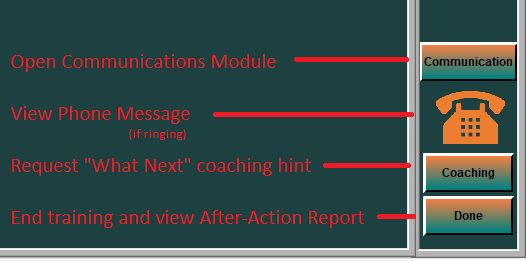
These buttons trigger various GOAT modules: the Communcations module, the phone module, the What-Next Coaching module, and a button to indicate scenario completion, which triggers the After-Action Report.
Technical Information
There are 4 variables added to the KGRTC_DB/Books/IS/RF.ogd file:
bool goat_comm_module;bool goat_what_next_coach;bool goat_done;bool goat_phone_ring;
The first three booleans are quickly set to 1 and then 0 when the associated buttons are clicked, which GOAT detects to open the associated window. GOAT sets the goat_phone_ring variable to 1 to trigger the phone ringing.
Phone module
The phone module is still very basic. Currently it's only triggered when a Check with the name ACETooHigh is triggered. When this happens, the phone begins to ring:
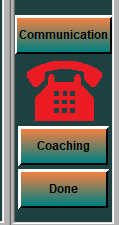
When clicked, it displays a very simple message to try and guide the trainee back on track:
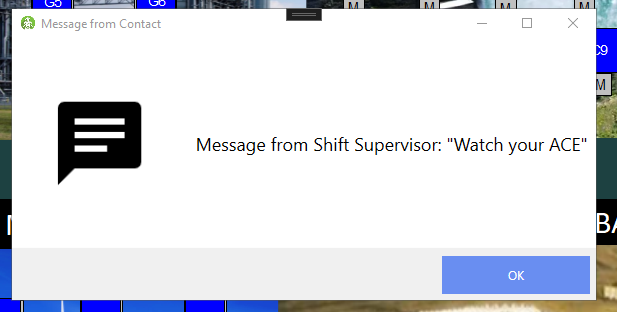
The phone module is planned to be expanded in the future.
ITS Integration (work in progress)
There is also another version that has more modifications in order to communicate with the Intelligent Tutoring System (ITS) software also developed by Curtiss Wright. The goal of this integration is to increase the effectiveness even further by instructing the trainee step by step through the training scenario before letting them try it on their own. This adds two more changes to the same RF.ogd file as above:
int goat_accomplishments[128];int goat_score;
goat_accomplishments is a list of accomplishments that have been completed, where each entry is used as a boolean. The array is used by ITS to progress through the lesson. goat_score is used to display the total ITS score.
There is much expansion to the ITS integration planned for the future.